Redeveloping the mobile app
From Figma handoff to shipping the interface in code, while the mobile app was rebuilt from scratch.
Overview
The project started as a rebuild of our existing mobile event application in React Native. What made it interesting was not just the technology shift, but the opportunity to rethink how design was created, tested, documented and handed over to engineering.
On the legacy app, designing even relatively small mobile features could become slow and fragmented. The application was heavily configurable, different events exposed different functionality, and there was no reliable environment that represented a realistic product state. A designer often had to find the right event, obtain credentials, reproduce a specific configuration and then understand how an existing feature behaved before even starting to design.
Once I joined the rebuild, I had a much larger area of responsibility. Usability, accessibility, visual quality and interaction behaviour were no longer split between multiple layers of the process. I was responsible for what ultimately shipped.
That changed the way I worked.
Designing against a moving target
The existing application was part of a much larger, highly configurable system.
A feature could behave differently depending on the event, configuration or user state. QA environments were optimized for testing edge cases rather than representing a clean, realistic product experience.
That meant a simple question such as:
"How does this feature actually work today?"
could require finding an event where it was enabled, getting access to it, finding the right credentials and navigating through a highly customized application.
The problem continued during development.
Even after a design had been technically approved, implementation generated another layer of questions. Sometimes development started months after the original design work, making context difficult to recover.
So the traditional workflow looked roughly like this:
Task → Analyse → Research → Figma → Clarifying questions → Usability testing → Technical approval → Handoff → Development → Questions → Rework
I wanted to get closer to:
Idea → Build → Test → Iterate → Ship
I built the first mobile feature in native code
The first major experiment was the Session Calendar View.
Instead of creating another static Figma prototype, I decided to build the interaction directly in Xcode for iOS and Android Studio for Android.
I started by rebuilding a highly accurate version of the existing application and then layered the new calendar experience on top of it.
The difference was immediate.
I could test real interactions instead of simulating them:
- swiping between days
- opening and closing cards
- handling overflow
- navigating between states
- testing different amounts of content
- seeing how the layout behaved with realistic data
Those interactions would have required a large number of connected states in Figma. In code, they became real behaviour.
Real data changed the design
The prototype initially used mocked data, but I wanted to understand what the calendar would look like in a real event.
I used data from an actual event and reconstructed the sessions inside the prototype. That exposed a problem that wasn't obvious from the initial concept.
At the real event, a large number of sessions occupied the same time range. On a three-day mobile calendar, many sessions would disappear into overflow.
That led to another design decision: quick filters.
Instead of treating filtering as a secondary feature, I introduced track-based quick filters so users could narrow the calendar to the sessions relevant to them.
This is an example of why I wanted the prototype to be more than a visual representation.
The prototype became a way to discover product problems, not just communicate solutions.
Learning to prototype with code
At that point, I barely knew Xcode or Android Studio.
I started experimenting with Claude Code directly inside the project. Rather than learning mobile development first and applying it later, I learned by rebuilding the interface step by step.
I started with individual components, such as the existing session card, and gradually reconstructed the screens and interactions.
The process looked like:
Existing product → Component → Screen → Interaction → Real data → Test → Refinement
Claude could also work from platform documentation, which became especially useful when I needed to understand differences between iOS and Android interaction patterns.
After roughly a week and a half to two weeks, including testing and the additional filtering work, I had working prototypes that developers could open, explore and use as implementation references.
At one point, instead of asking developers to interpret a Figma flow, I could simply point them to the working prototype.
The prototype answered the question itself.
This changed my role on the rebuild
The prototype was also what led me deeper into the rebuild.
What started as an experiment became a broader way of working: rebuilding the application in React Native while treating code as part of the design process rather than something that happened after design.
On the rebuild, I had direct responsibility for:
- Usability. Making sure flows were understandable and behaved as intended.
- Accessibility. Considering accessible behaviour as part of the interface rather than something completely separated from design.
- Visual design. Owning how the product actually looked in production.
- Interaction design. Being able to define and implement behaviours rather than only describing them.
This was a significant shift from the legacy environment, where many of these responsibilities were constrained by the existing system and split between design, product and engineering.
Designing the system while building the product
I didn't want the MVP to become a collection of one-off screens.
So from the beginning I introduced a component-based approach and set up Storybook alongside the application.
Typography and existing styles were carried into the project, while I established component and token rules that could be reused as the application grew. I also created a dedicated design branch so designers could work independently without interfering with development work.
This created a second benefit.
The Storybook was not only a developer reference. Designers could also control and evolve it.
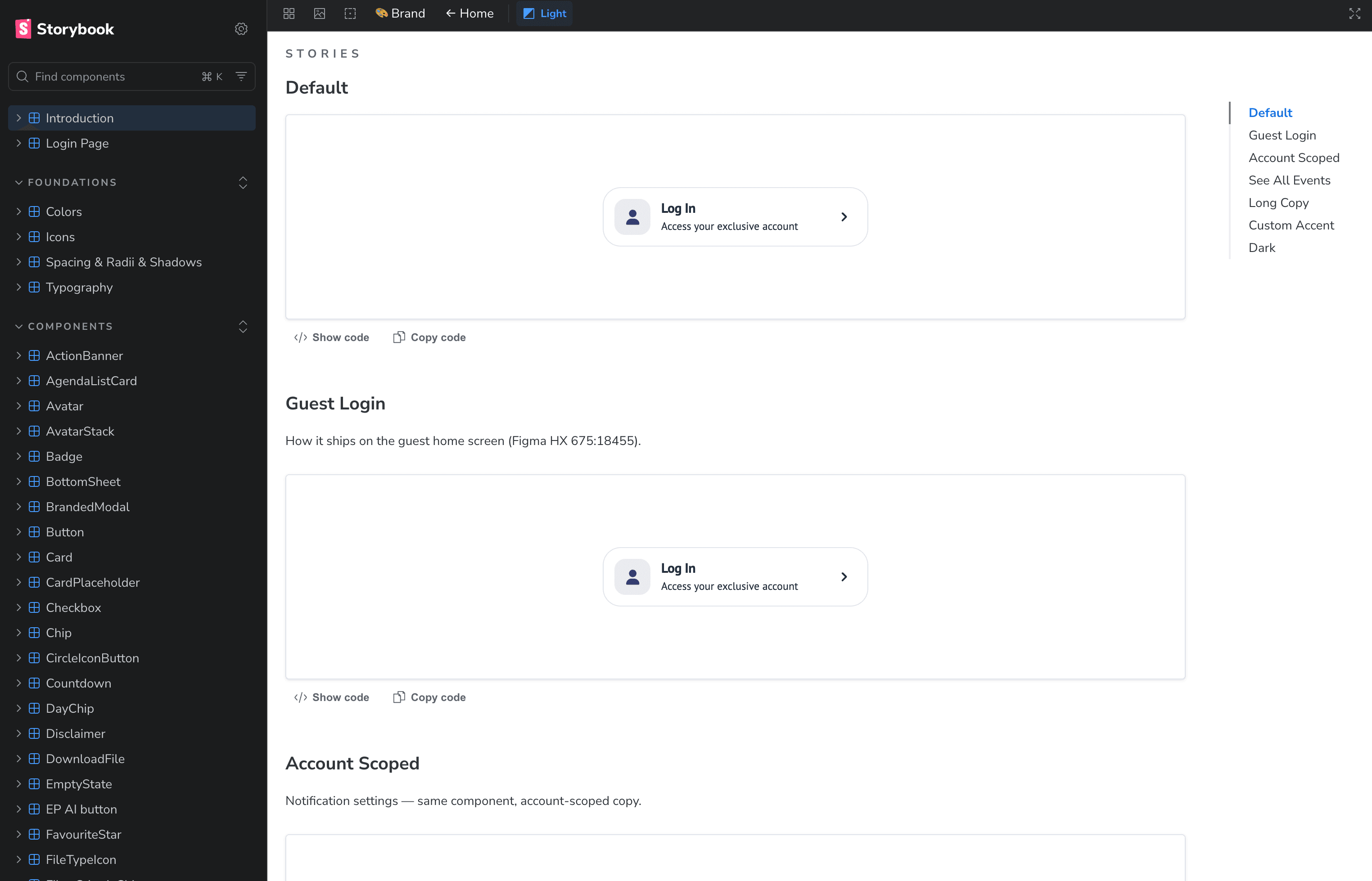
That mattered because the legacy Storybook was primarily owned by engineering, which meant the implementation could gradually diverge from the intended design.
For the new app, I wanted the source of truth to be something designers and engineers could both work with.
The Playground
The next problem was even bigger than the initial prototyping challenge.
Some product features had a huge number of possible states.
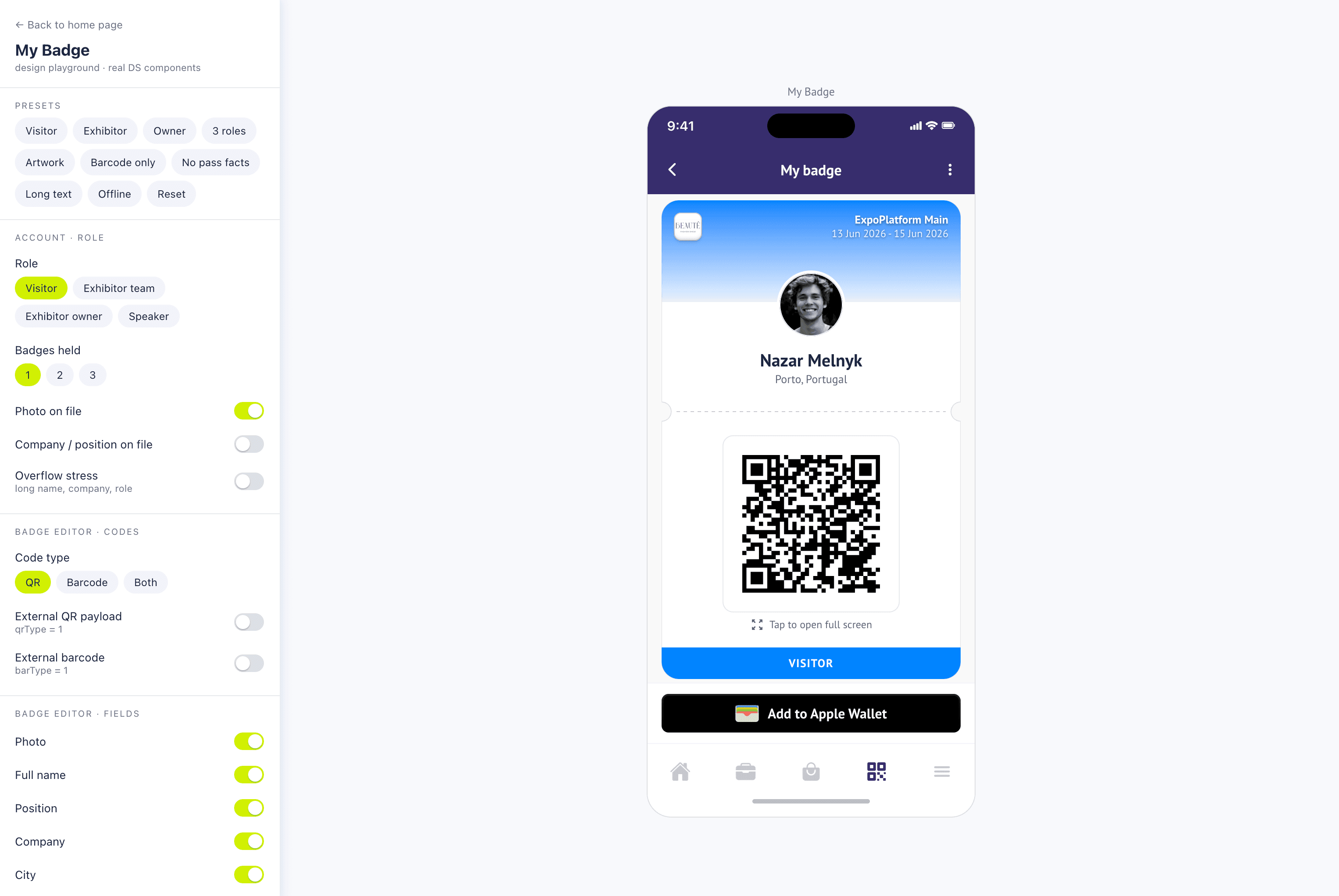
Take the event badge builder.
A badge could contain different combinations of:
- name
- job title
- country
- roles
- photo
- QR code
- barcode
- multiple badges
- different information densities
- connectivity states
Trying to inspect all of those states inside the production application was slow and mentally expensive.
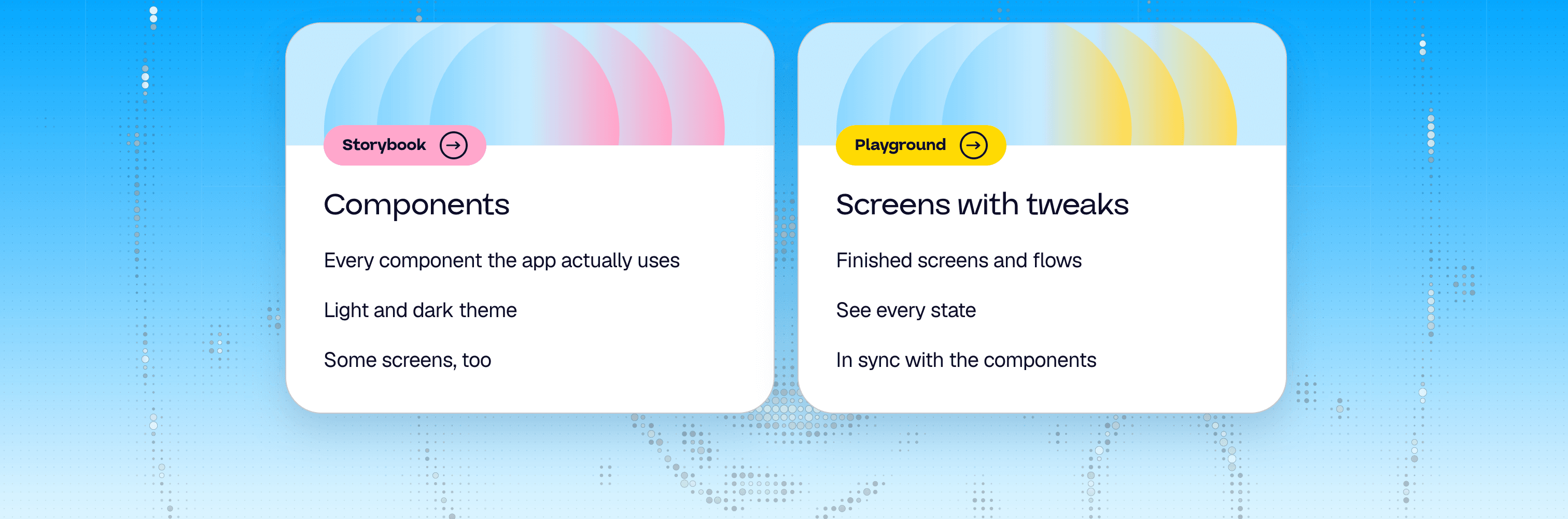
So I started building Playgrounds.
A Playground is a web-based environment where the different states of a feature can be explored independently.
Instead of navigating through the entire application, I could open one place and inspect:
Default state → Long content → Multiple badges → Offline → Different configurations → Overflow → Edge cases
The same environment could then be used by another designer or developer later.
Why the Playground mattered
The Playground became more than a testing tool.
It became a shared memory for the interface.
A designer could use it to explore variations.
A developer could use it to understand behaviour.
A future designer could return months later and immediately see the states that already existed.
That was particularly useful in a product with a large amount of conditional behaviour.
Instead of keeping all possible states in my head, I could externalise them into an interactive environment.
There were still limitations. Some native animations and behaviours could not be represented perfectly in a web-based environment because React Native and web implementations differ.
But the Playground could still represent the majority of the product logic and visual states in a much faster, more accessible way than navigating the production application.
From handoff to living documentation
As the project evolved, I also started documenting the reasoning behind decisions.
Claude generated a design worklog and design specification for each task:
- what I explored
- what decisions were made
- which alternatives were considered
- why a particular solution was chosen
- what changed after conversations with product or engineering
At the end of a task, I could generate a structured handoff document containing the relevant decisions, links and even screenshots from the prototype.
That turned handoff from a one-time transfer of information into a continuously accumulated source of context.
The new workflow
The result was a different design-to-development loop:
- Understand. Analyse the problem, product context and existing behaviour.
- Explore. Use research, existing product patterns and AI-assisted exploration to generate possible solutions.
- Build. Create the interface directly in code when interaction fidelity matters.
- Validate. Test realistic data, states and edge cases.
- Document. Capture decisions, specifications and component behaviour.
- Ship. Merge the implementation into the product rather than handing over a static representation of it.
The important shift was not that I stopped using Figma.
Figma became one tool among several.
Code became another design medium.
Impact
The biggest impact of the rebuild was not a single UI change.
It was changing what was possible for me as a designer.
I could:
- Validate behaviour before development. Instead of asking whether an interaction was feasible, I could build it and test it.
- Work with realistic product data. Real event data exposed problems that were invisible in abstract mockups.
- Reduce ambiguity during implementation. Developers could inspect working behaviour rather than reconstructing it from static screens.
- Make edge cases visible. Playgrounds allowed complex configurations to be explored deliberately.
- Keep design closer to production. Components, Storybook and code became part of the design system rather than something completely downstream from Figma.
- Take greater ownership of the shipped experience. On the rebuild, the boundary between "design" and "implementation" became much thinner.
What I learned
The biggest lesson was that technical fluency doesn't necessarily turn a designer into a developer.
It makes the designer better at making decisions.
When I could build the interaction myself, I stopped designing only for the abstract possibility of what might work.
I could test it.
I could break it.
I could compare alternatives.
I could understand technical constraints earlier.
And, most importantly, I could discover product problems that were impossible to see in a static design.
That changed my definition of a prototype.
A prototype is not only something that communicates an idea.
Sometimes, the prototype is the first version of the product itself.
Outcome
The rebuild gave me a new way of working:
I moved from designing interfaces that developers would later build to building interfaces that could already be tested, discussed and refined before they shipped.
That became the foundation for how I approach product design today.