Rejected idea or opportunity?
How one decision that was not accepted changed my approach to design, and a practical guide to unmoderated testing in Maze.
Introduction
In fact, one of the reasons for writing this article was a meme that came to my mind:
Batman doesn’t have superpowers, but his strength lies in his mastery of his tools. Designers also have our own “tools,” and testing is one of them.
Often during the work process, it feels like our ideas are not heard or that they do not receive proper recognition. But testing is a way not only to validate your work but also to support it with objective data.
This article is about how one decision that was not accepted changed my approach to design and helped me better understand my role.
For this article, a playful cover was created.

The article consists of 2 parts:
- A story about my personal experience facing challenges when my idea was not accepted. How I managed to rethink the situation and find answers to my questions through mentorship. I will also discuss why it’s important to continue proposing your solutions and how testing can be used to validate your ideas.
- The practical part — we will look at moderated and unmoderated testing, the Maze platform, and an example of setting up testing.

Part 1
Does my role as a designer boil down to gathering everything from the component library, or can I do something more?
This question arose after I worked on the design of a radar chart. I proposed an option that I believed would enhance the user experience, but the development team insisted on using the standard chart from their component library. Of course, such moments are not very pleasant.
Doubts began to swirl in my mind: “Did I defend my idea enough? Is my work worthless? Am I now just assembling something from ready-made components like a constructor?”

At that moment, I was already feeling the initial signs of burnout, and this situation further took a toll on me.
But fortunately, I was gifted a certificate for a mentorship session with an experienced designer. In one hour, I got answers to all the questions that had long troubled me. (Shout out to Stas Hovorukhin 🙌🏻)
If you feel stagnant or doubtful, invest in mentorship.
This session taught me that decisions are often not related to your design skills or your ability to advocate for ideas. Sometimes it can be due to limited resources, high implementation costs, or other business priorities. And it’s important to remember: This doesn’t mean you’re a bad designer; it means your idea can’t be realized right now. This shift in perspective brought immense relief.
Always keep proposing new ideas, even if they are rejected.
Designers need to be the ones who seek better solutions. Even if your idea is not accepted immediately, it may become useful later or serve as a foundation for future solutions. Don’t be afraid to experiment and advocate for what you believe is best for users.
Testing — a tool?

To solidify my ideas, I decided to use testing. Unmoderated testing became an opportunity to obtain objective data on which design option works better.
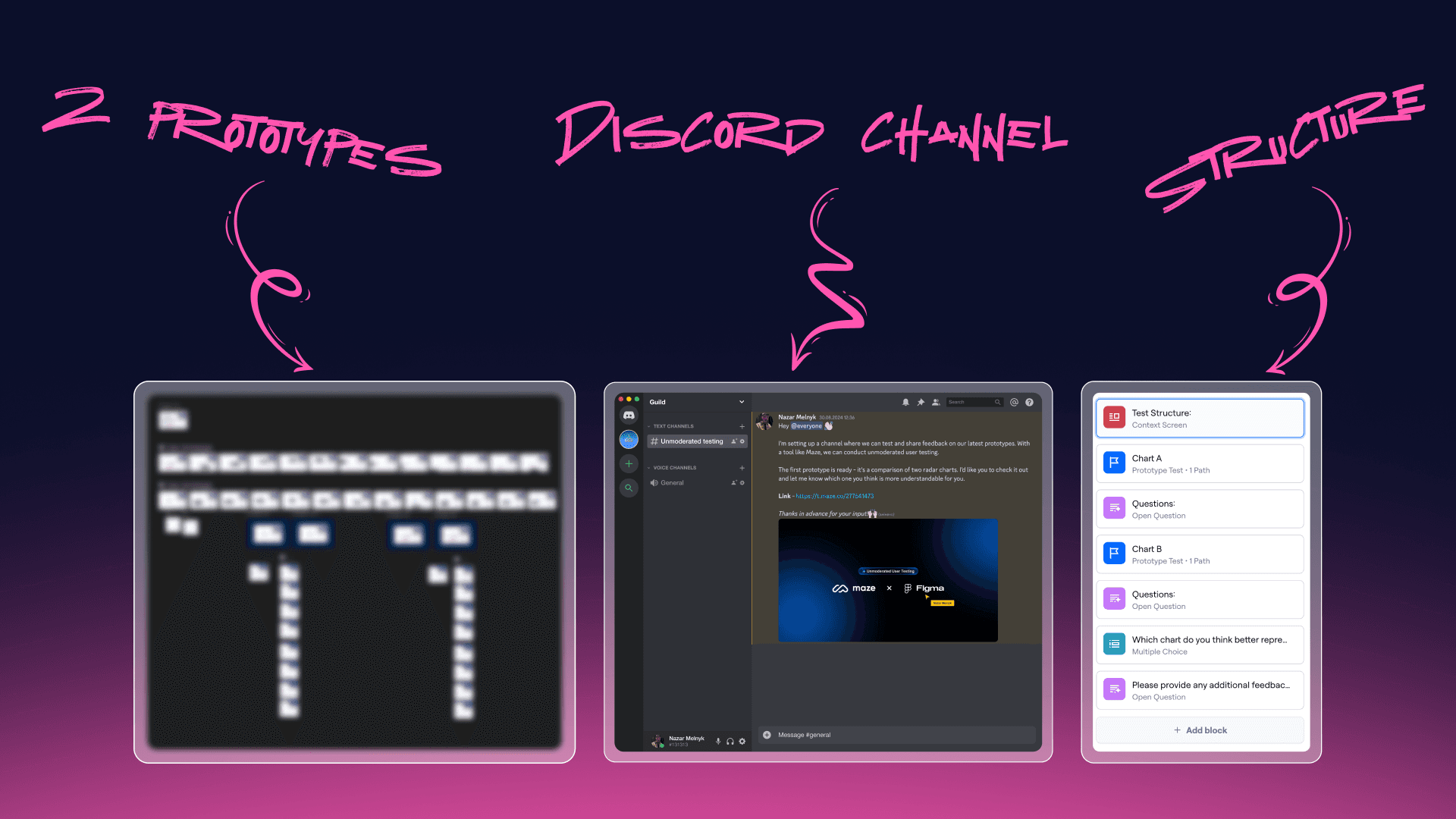
I had long wanted to try unmoderated testing and decided to test two options for the radar chart: the standard version from the developers and my proposed design. I created 2 prototypes, a channel in Discord where I invited respondents, set up the test in “Maze,” and sent the link.
The testing involved 27 participants, including those who were completely unaware of the project’s context. The results showed that my option was more understandable for users.
Testing helps you not just “defend” an idea — it gives you data for persuasion.
Testing showed that my idea was indeed better in terms of user experience. And these were no longer just my words — these were numbers and data. Using tools like Maze allows you to obtain objective evidence that can strengthen your arguments.
Conclusion
This experience changed my perception of the process. Sometimes decisions are not accepted not because they are bad, but due to the limitations faced by the team. This doesn’t mean that one should simply agree to a simpler option. By testing my idea to see what actually works for users, I did everything I could as a designer instead of just agreeing to an easier solution.
Part 2
Best Practices for Testing in Maze
User testing plays a crucial role in ensuring a product’s usability and success. Maze, a remote testing platform, enables designers to validate their designs at various stages, offering both moderated and unmoderated testing options. In this article, we will focus on unmoderated testing, its benefits, and how to conduct it effectively. We will also highlight key differences between moderated and unmoderated testing to help you choose the right approach for your project.

What is the difference between moderated and unmoderated testing?

Moderated remote testing - involves a researcher meeting with a participant via remote screen-sharing software, which allows the researcher to provide instructions, observe the user’s interaction with the design in real time, and ask followup questions specific to that participant’s session.
Unmoderated remote testing - does not require a researcher to attend each test session; instead, a software application provides instructions to users, records their actions, and may ask them predetermined followup questions.
Unmoderated testing - is a form of usability testing where participants interact with a product or prototype without real-time supervision. In Maze, designers create tasks or scenarios for users to complete on their own time, while Maze collects data like heatmaps, click rates, and task completion times. This method is particularly useful for gathering quantitative insights quickly, as it allows you to scale the test to many users simultaneously without needing to be present.
Unlike moderated testing, there’s no facilitator to guide participants through tasks, meaning participants must rely on clear instructions and intuitive design.
Key Differences Between Moderated and Unmoderated Testing
While both moderated and unmoderated tests offer valuable insights, they differ in several key areas:
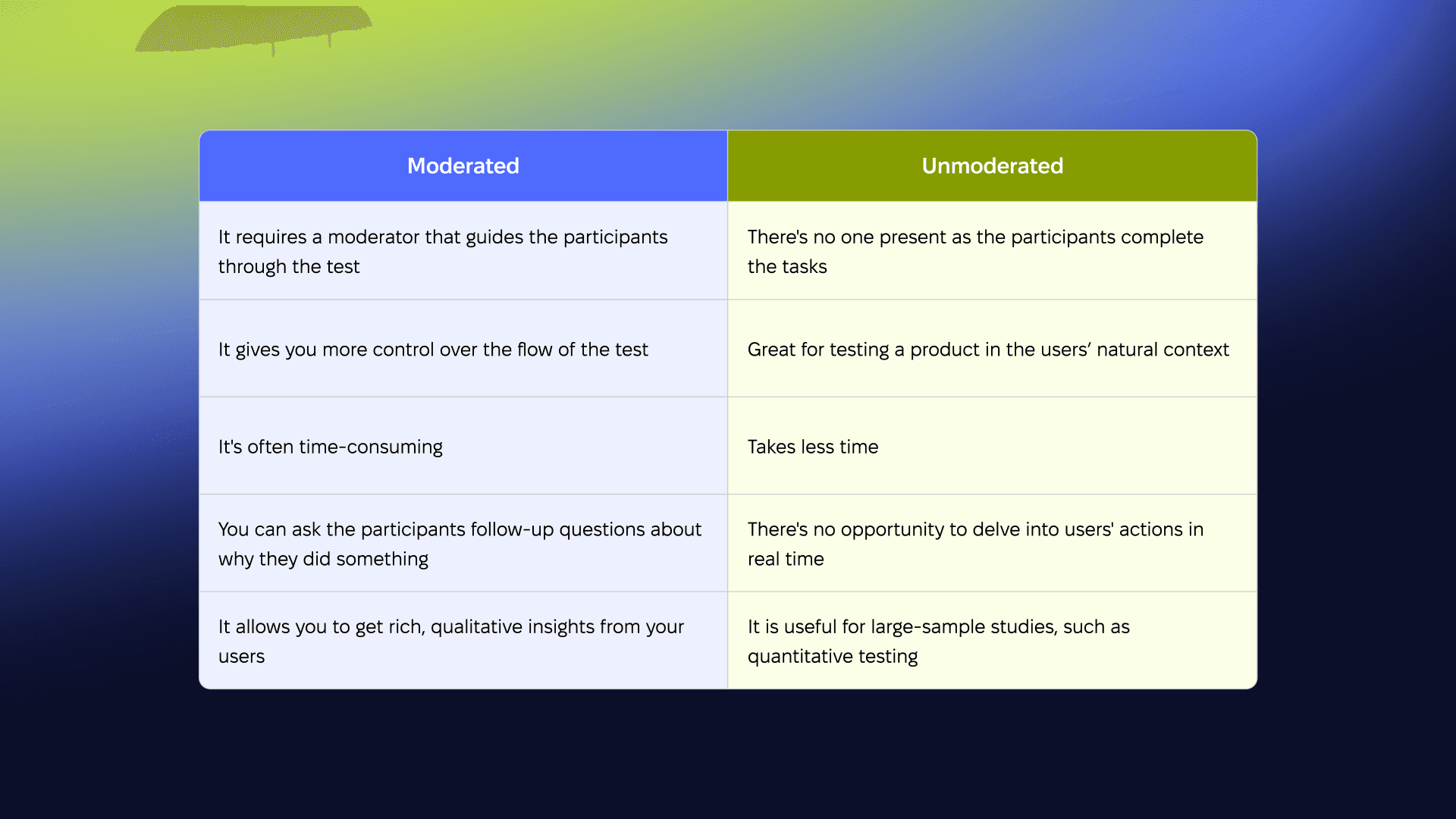
- Control: In moderated tests, a facilitator can clarify tasks and probe deeper into user behavior. In unmoderated tests, you rely on users interpreting the tasks on their own.
- Feedback Type: Moderated tests allow for real-time feedback, while unmoderated tests provide asynchronous feedback, typically limited to quantitative data.
- Time: Unmoderated tests are generally faster since they can be run on-demand and without a moderator’s presence.
- Depth of Insight: Moderated tests often offer more qualitative insights through user conversations, while unmoderated tests focus more on general usability.
When to Use Unmoderated Testing vs Moderated Testing?
There’s no right or wrong answer as to whether you should use moderated or unmoderated usability tests. Both moderated and unmoderated usability testing methods are valuable in any design process.
There is no need to flip a coin to choose between these two testing methods. It will be enough to answer a few questions.

Here are some questions to keep in mind when deciding between the two:
1. What usability metrics are you looking to track? (Completion or success metrics, Duration metrics, Error metrics, Satisfaction metrics)
Explanation:
When you determine which specific metrics you need (Completion or success metrics, Duration metrics, Error metrics, Satisfaction metrics), it will help you understand which type of testing is best suited for your needs.
- Moderated usability testing is more appropriate if you need to dive deeper into metrics related to errors (Error metrics) or user satisfaction (Satisfaction metrics). During this type of testing, a moderator can ask follow-up questions to uncover why errors occur or how users perceive the product.
- Unmoderated usability testing is ideal for metrics that can be easily measured automatically without the need for a moderator, such as task completion time (Duration metrics) or task success rate (Completion metrics). This type of testing also allows you to gather a lot of data in a short period.
By defining your metrics, you’ll be able to choose the method that provides the most valuable insights to improve your design.
2. How quickly do you need results?
Explanation:
If you need results quickly, this can influence your choice of testing method.
- Unmoderated usability testing allows you to get results much faster since users can complete the test independently at their convenience. You don’t need to schedule sessions with a moderator, which significantly reduces the time needed to conduct the test and gather data. This is useful when you need to collect a large amount of data in a short time frame.
- Moderated usability testing usually takes more time because it requires coordination between the moderator and participants, scheduling individual sessions, and additional time for analyzing the results. This option is better when the results need to be more detailed, even if it takes longer.
So, the quicker you need results, the more inclined you might be toward unmoderated testing.
3. Is this the development of new functionality?
Explanation:
If you are working on developing new functionality, this can influence your choice of testing method.
- Moderated usability testing is the better option when testing brand new functionality. Since users are interacting with something unfamiliar, a moderator can provide explanations, answer questions, or clarify details during the test. This helps in understanding users’ initial impressions and gathering feedback on whether the new functionality meets its goals.
- Unmoderated usability testing is more suitable when the functionality is nearly ready for release or this isn’t the first iteration of its testing. In this case, users can test the feature independently, and you can collect a large amount of data without the need to schedule moderated sessions.
Therefore, if you are testing new functionality, moderated testing will offer more opportunities for a thorough analysis of user interactions.
4. What knowledge gap do you need filling to continue your design?
Explanation:
If you encounter a knowledge gap during the design process or need additional information, this will influence the choice of testing method.
- Moderated usability testing is better suited when you need more in-depth information or understanding of complex design aspects. The moderator can ask follow-up questions aimed at filling in the gaps in your knowledge. For instance, if you’re unsure how users interact with a specific feature or need detailed feedback on their expectations and experiences, moderated testing can help uncover these insights.
- Unmoderated usability testing is ideal for situations where you need to fill in basic knowledge or gain a general understanding of user behavior. It’s useful for identifying common issues or patterns but less effective for gathering detailed insights since there’s no opportunity to ask additional questions.
Therefore, if you require more detailed information to fill your knowledge gap, moderated testing is preferable, while unmoderated testing works well for collecting broader data.
In short
- Use Unmoderated Testing for large-scale usability testing, where you need to validate design choices quickly with minimal resources. It’s perfect for simpler prototypes and when you want to gather broad user data. This method is also good for testing hypotheses, comparing two options, or to test your idea.
- Use Moderated Testing for more complex user flows or when in-depth feedback is required. This type of testing is ideal for early-stage prototypes where user misunderstandings could distort results.
In general, unmoderated testing shines when you’re confident that users can navigate the design without needing additional context or guidance.
Best Practices for Unmoderated Testing in Maze
To get the most out of your unmoderated tests in Maze, follow these best practices:
- Write Clear, Actionable Tasks: Since participants are completing tasks without guidance, it’s essential to make instructions as clear as possible. Use direct language and avoid ambiguity.
- Test Your Prototype Before Launching: Ensure there are no technical issues with your prototype, such as broken confusing navigation, clickable elements highlighting, etc., to prevent drop-off rates.
- Incorporate Follow-up Questions: While unmoderated tests lack real-time discussion, including post-task surveys can help you gather qualitative feedback on the user experience.
- Leverage Maze’s Analytics: Maze provides detailed reports, including heatmaps and misclick data. Use these tools to understand user behavior better and identify pain points.
Example of creating sections
We can consider a case where we need to compare two designs and get feedback from users.
This is not exactly A/B testing
This is not exactly A/B testing, in classic A/B testing, each user is typically shown only one version to avoid influencing their choice through direct comparison. This approach provides “cleaner” data about their behavior since users are unaware of the other version.
However, there is an alternative testing method where users are shown both versions (this is called preference testing), and they choose which one they prefer. This approach is useful when you want to gather feedback on which version is subjectively more appealing. However, it is less objective from a behavioral analysis standpoint, as the choice between two versions can be influenced by direct comparison.
As we defined earlier, if we decide that unmoderated testing is right for us, we need to prepare 3 things:
- Prototype
- Scenario
- Maze sections
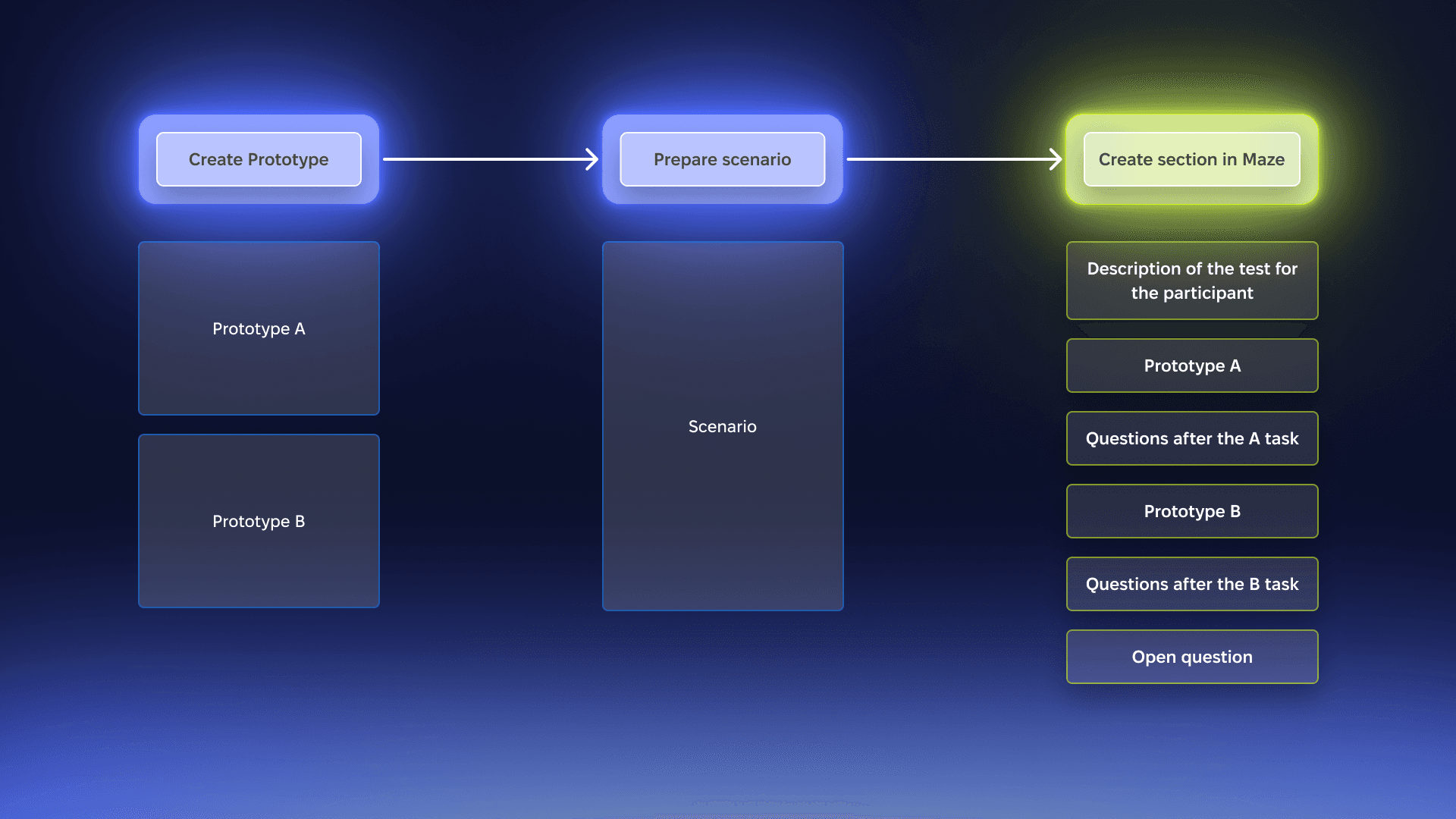
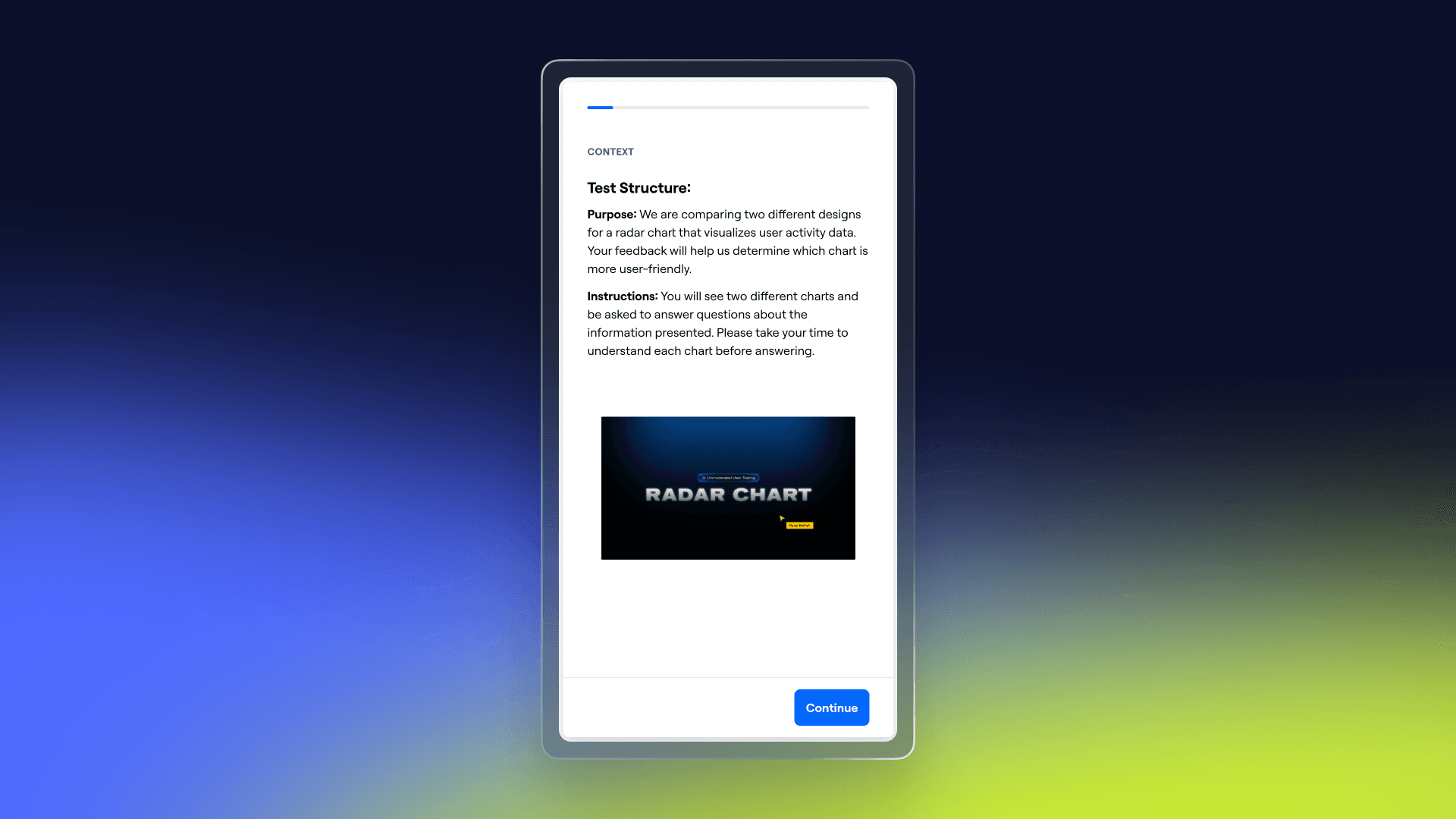
- In the first section, you should explain the purpose and objectives of the test. (Add a picture to attract attention.)
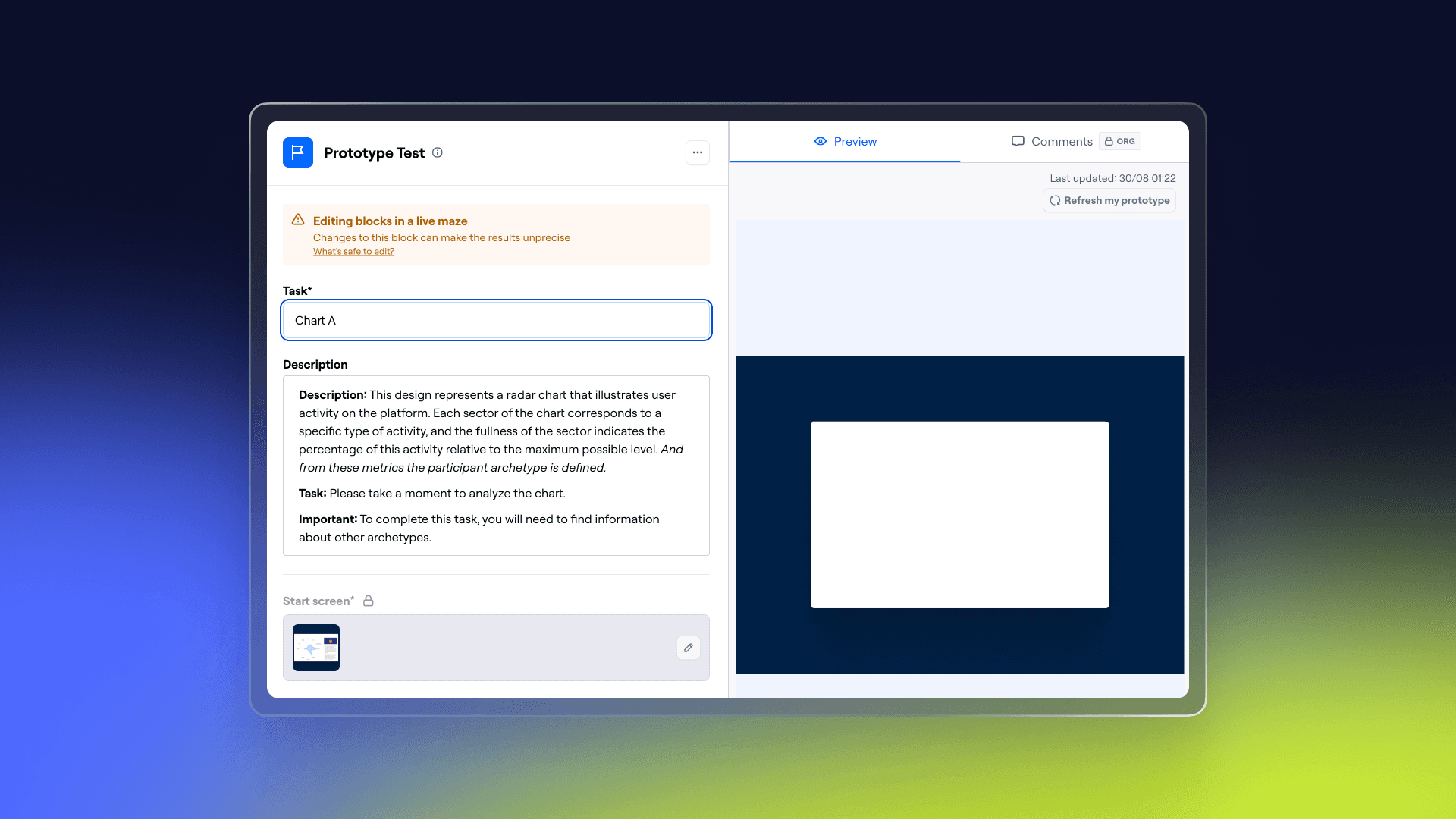
- Attach a prototype and describe very clearly the task that the participant needs to perform.
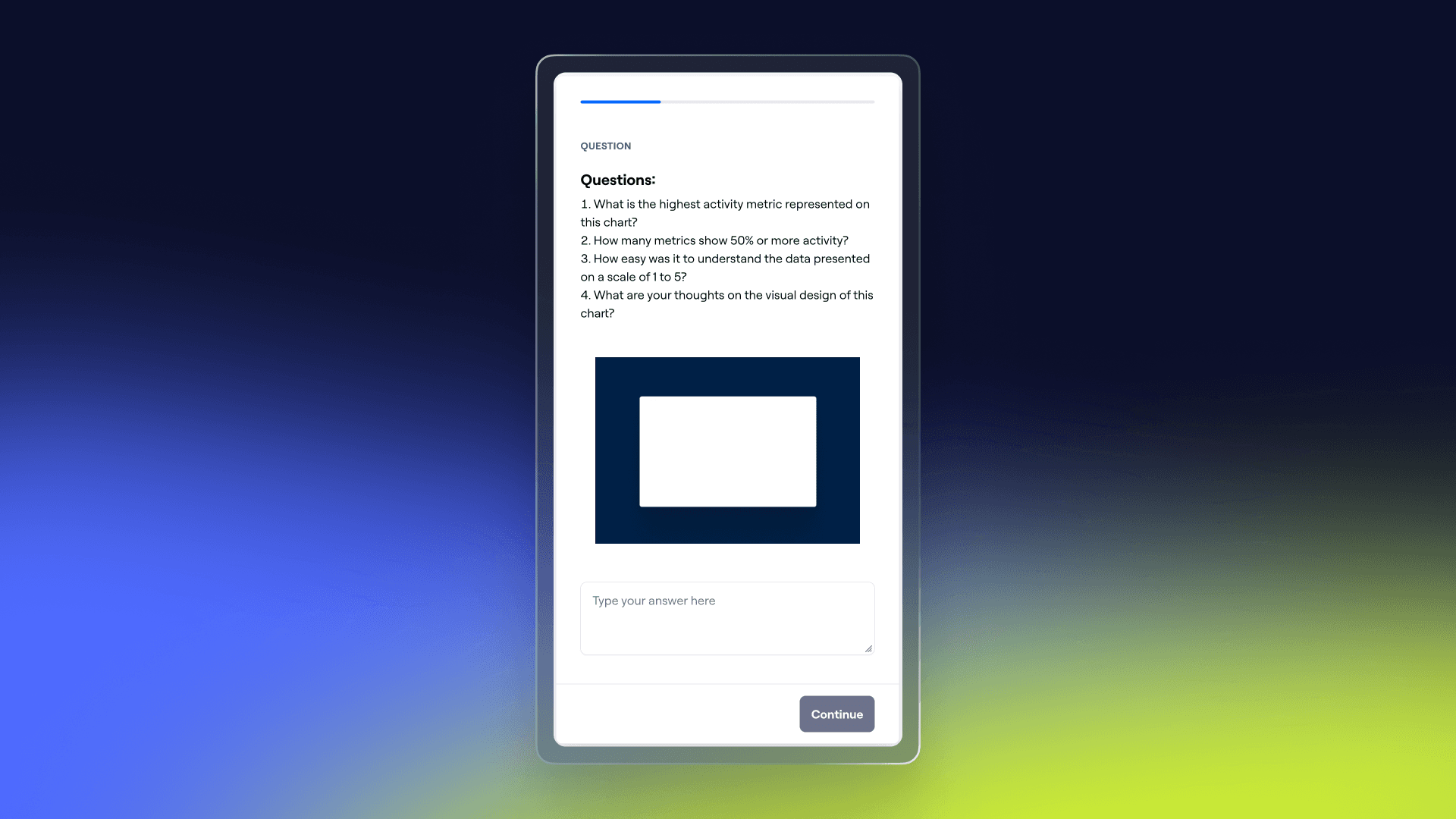
- After completing the task, ask clarifying questions. It is advisable to ask each question separately, because it will be easier for the tester and for you, since it will be much easier to analyze the information later. (But the free version has many restrictions on the number of blocks.)
- Add a block with prototype B and a block with questions for it.
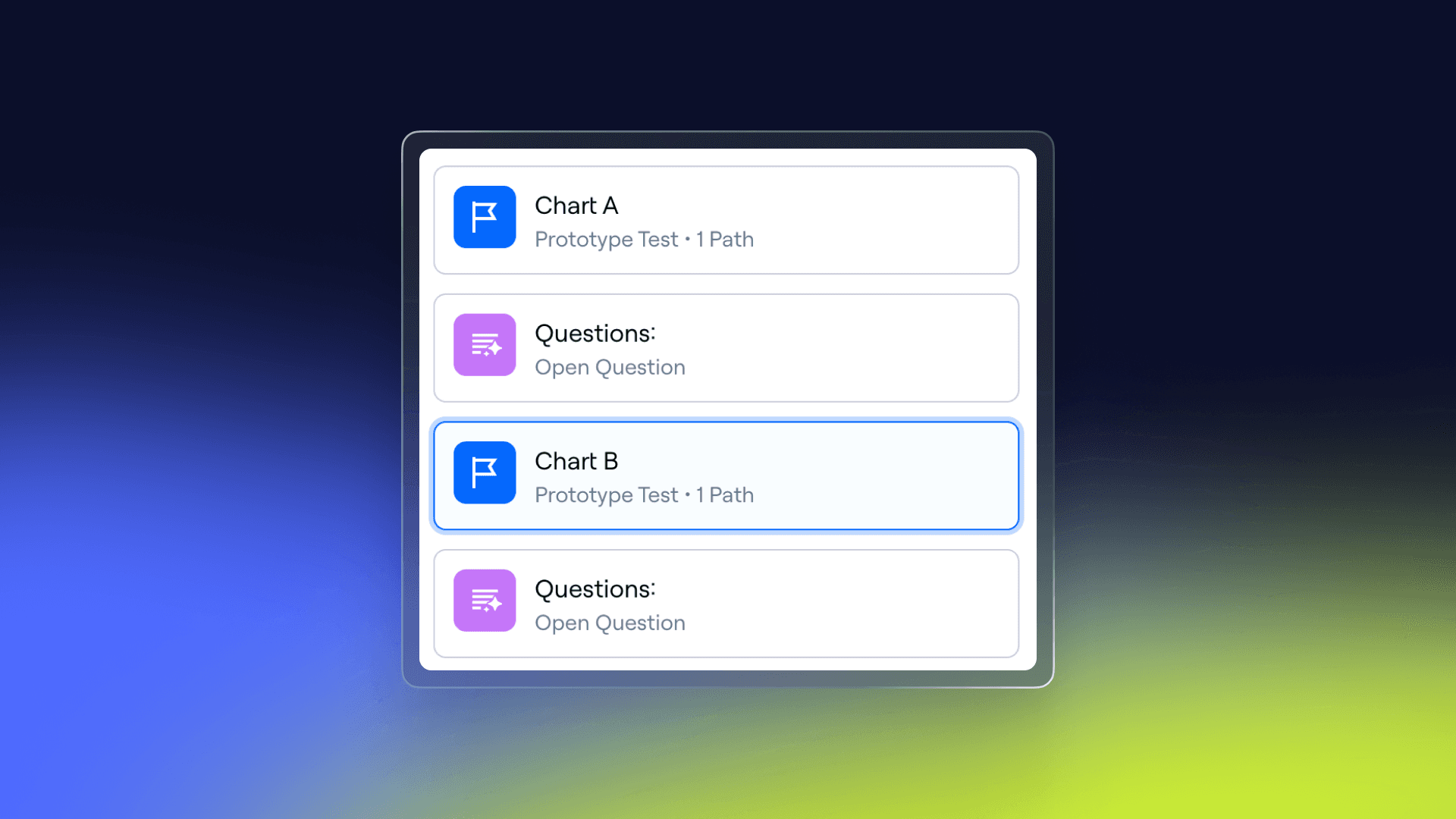
- You can make a general vote on which prototype was the most convenient. Don’t forget to include screenshots of the two prototypes.
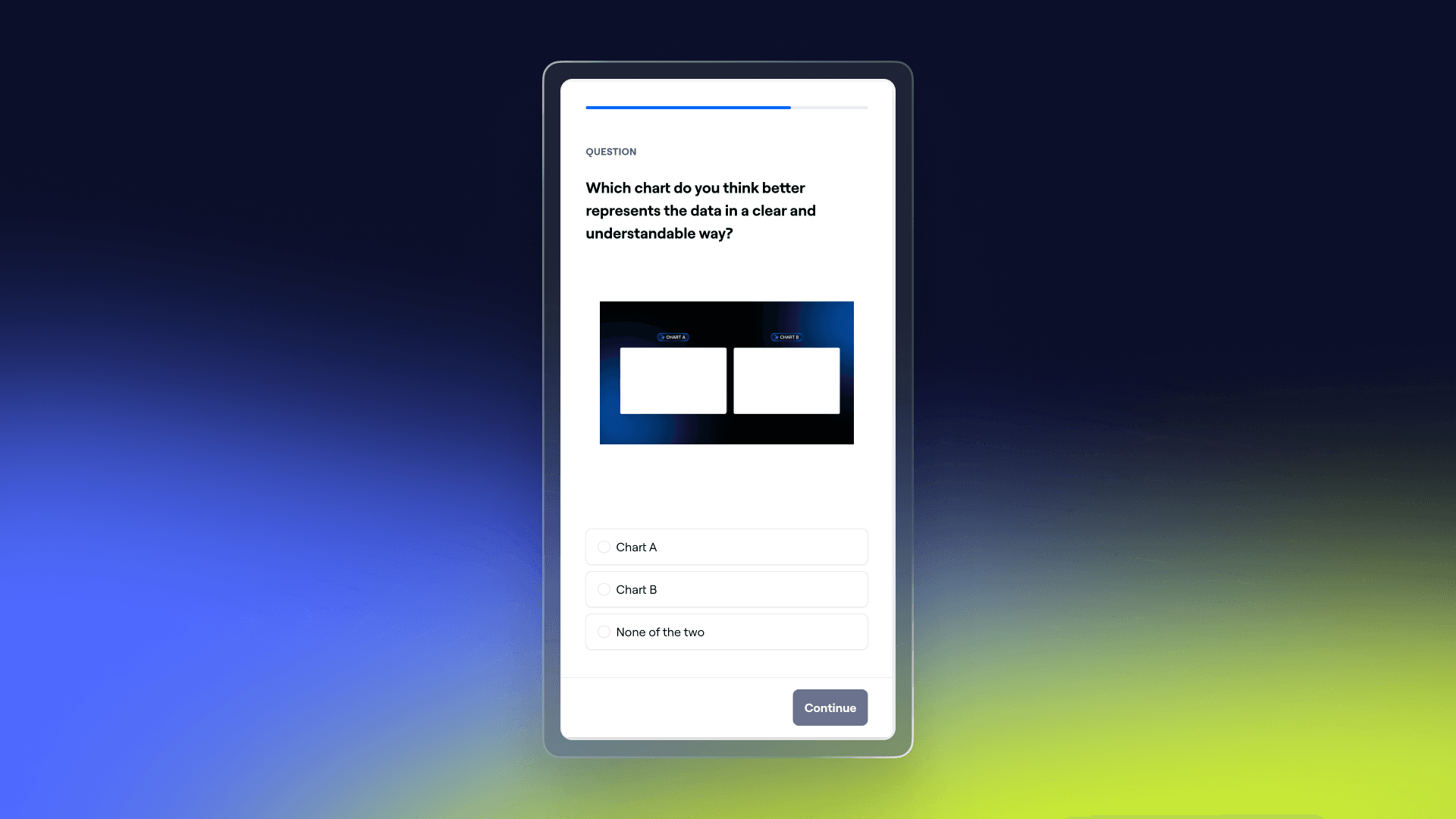
- Leave the last block as an open question. This way, people can share their general impression of what they saw.

After you’ve added the blocks, be sure to test them yourself in preview mode. Then you can send the link to the participants.
Common Pitfalls and How to Avoid Them

Some common challenges of unmoderated testing include:
- Vague Instructions: If tasks are not specific enough, users may misunderstand them, leading to poor-quality data.
- Misinterpreted Data: Without direct observation, it’s easy to misinterpret certain behaviors. For instance, a user might click on the wrong element because of unclear labels, not because they don’t understand the task.
- Participant Drop-off: If the test is too long or difficult to complete, users may abandon it. Keep tasks short and ensure the prototype is smooth to maintain engagement.
Analysis of the results
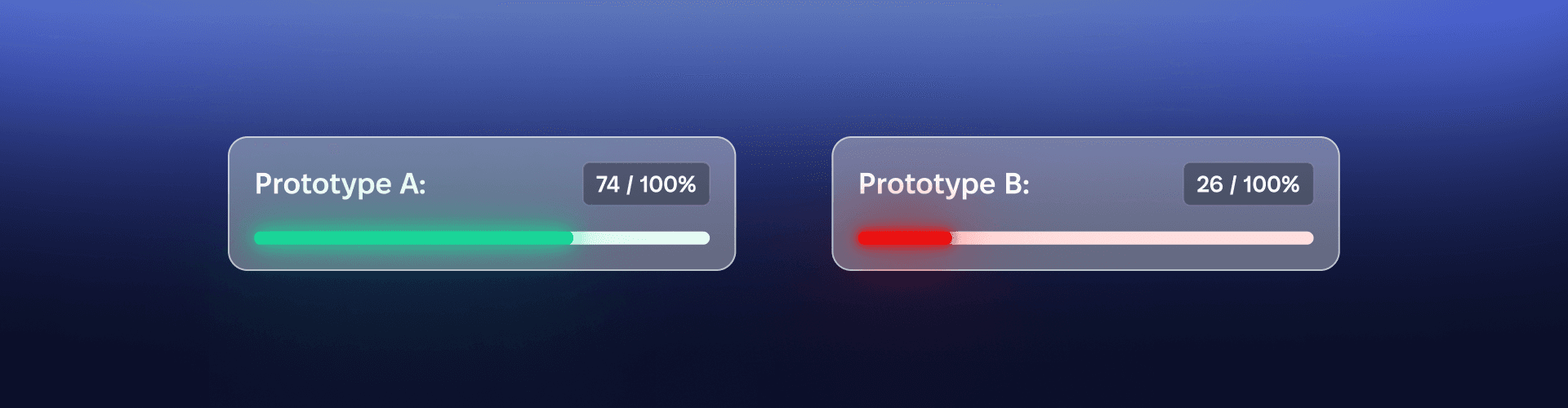
It is possible to collect data not only through participant feedback, but also to look at heatmaps, how long it took participants to complete the task, how long they stayed on one of the screens, all of which can help in further design.
Checklist of things to do before sending the test

✅ Define Clear Goals: Ensure that the test objectives are well-defined and align with what you want to learn.
✅ Write Precise and Concise Tasks: Tasks should be clear enough that a child could understand them.
✅ Test the Prototype: Ensure that the prototype functions correctly. All interactions and pages should be accessible and work as intended.
✅ Ensure Simplicity of the Test: Make the test short enough. Participants should not feel overwhelmed or spend too much time.
✅ Text and Cover: Write a brief text for the message you will send and create a cover to attract attention.
✅ Specify the Duration of the Test: Indicate in the message how long the test will approximately take, as people often do not complete testing due to uncertainty about its duration.
✅ Send the Message.
Important: Do not send the testing to those who participated in the development of the functionality, as their responses may be biased due to their role.
Conclusion

Unmoderated testing in Maze is a powerful tool for scaling usability testing and gathering quick feedback, especially when used for simple prototypes and when resources are limited. By following best practices — such as providing clear instructions, testing your prototype beforehand, and leveraging analytics — you can ensure the success of your unmoderated tests. Choose the right type of testing based on your needs and goals.